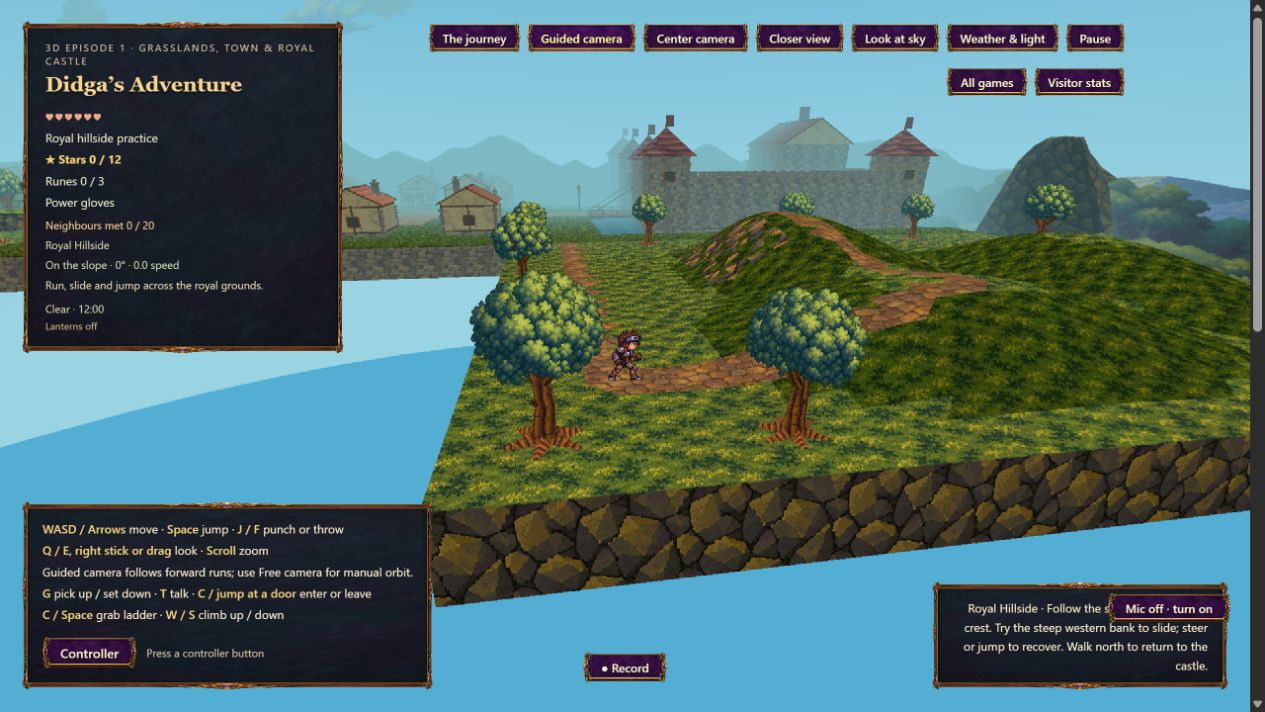
The larger grounds make long runs and changes of direction easier to notice. Guided camera adds a small amount of help: after Didga settles into a forward or forward-diagonal run, the view eases around behind his travel direction.
Give a run time to become a run.
Following waits 0.45 seconds before it begins. The turn is capped at 0.7 radians per second, about 40 degrees per second, and settles within a 12-degree deadzone. Those limits help the camera stay quiet through small heading differences.
Standing still, pure strafing, backward movement, airborne movement and pushing into an obstruction hold the chosen view. The camera follows sustained forward intent rather than every step or jump.
Keep a held diagonal on its course.
A camera turn also changes what screen-relative directions mean. If a held diagonal were recalculated against the rotating view every frame, it could steer Didga and the camera into a continuing circle.
Guided mode keeps an unchanged movement gesture on its chosen world-space bearing as the camera eases. Release the keys or stick, or make a deliberate direction change, and the next gesture uses the newly chosen view. Small analog jitter does not keep resetting the turn.
Manual looking still gets the first word.
Use Q/E, the right stick, or drag the view to look around immediately. Manual looking holds that choice for 1.6 seconds before the normal follow delay can begin again. Center camera remains available and receives the same short grace period.
The Guided camera / Free camera control lets you choose. Free camera keeps the earlier fully manual behavior and screen-relative movement.
Respect the rooms and the landscape.
Guided following is suspended in caves and their transitions, inside interiors, on ladders and while inspecting the sky. Returning to ordinary outdoor movement starts fresh instead of releasing a stored camera turn.
The existing camera collision resolver stays active. Cave framing, zoom, pitch control, tree occlusion and layered parallax remain part of the view. Pausing or losing game focus also pauses the camera timers.
What the checks establish.
Automated checks: all 660 game checks passed, including the camera behavior and nine monster-art contract checks; all 36 selected website-package, scoped-release-preparer and new-journal checks passed.
Native browser movement review: a 5.02-second held W+D run traveled 29.399 world units with a 29.3985-unit endpoint chord and 0.0822-unit maximum cross-path deviation while the camera eased 0.5841 radians, with no respawn; two seconds idle produced no movement or camera-yaw change; holding E for one second turned the view 1.7 radians and ended in manual mode with a 1.6-second grace period; Free camera was selected through the actual button; a five-second W+D run kept camera yaw unchanged and did not respawn; the local public package started as 0.30.0 with Guided camera selected, entered the royal hills through the real menu and displayed clear summer/noon through the actual settings.
The image above is an actual browser gameplay capture from the reviewed 0.30.0 website package: a 1265-by-712 JPEG screenshot decoded to PNG without cropping, resizing or repainting. A still image shows the scene and its controls; the separate native movement observations establish how the camera turned. Software input checks do not establish a fresh test with a physical controller.